The Enterprise Guide to Automated Customer Support with AI



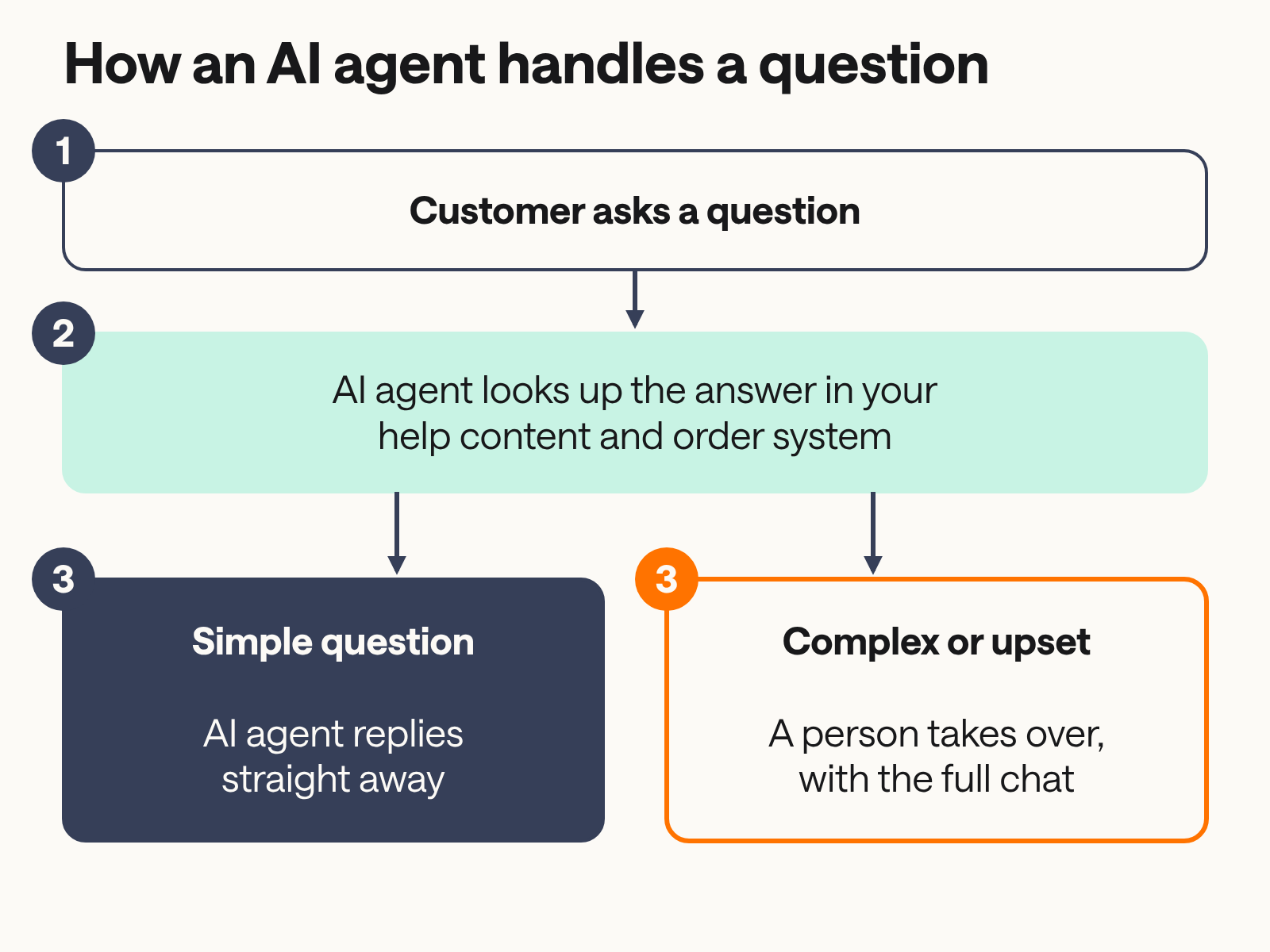
It's 23:40 on a Sunday. A customer has paid for a sofa, the delivery window has passed, and the tracking page still says "processing". They open your chat and ask where their order is. By Monday morning the question waits in a queue with 4,000 others, most of them about order status, returns, address changes, and invoices. Automated customer support uses AI agents, self-service tools, and workflow automation to answer routine customer questions without a person on the other end. It answers what it can straight away, hands complex cases to the right person, and works around the clock across chat, email, voice, and messaging apps. Gartner predicts that by 2029, agentic AI will resolve 80% of common customer service issues without human help, cutting operational costs by 30%.
For a support leader running 100,000 or more tickets a year, hiring to match volume stops working. Each new agent needs weeks of training, peak seasons need more people than the rest of the year, and every new market adds another language to staff. Customer service automation has moved on from rule-based FAQ tools that matched keywords to AI agents that read intent, check your systems, and complete the task. This guide covers how the technology works, seven ways to apply it, the trade-offs, a step-by-step rollout, and how to measure the return, so you can cut operating costs, raise CSAT, and give your team more time for the cases that need a person.
What's powering automated customer support?
AI driven customer support combines large language models (LLMs), machine learning, and automation across the whole service process. Natural language processing reads what the customer means, including typos, half-finished questions, and frustration. Generative AI writes a reply in natural language, and when it draws only on your verified knowledge base and order data, the answer stays accurate.
Three technologies do most of the work:
- Natural language processing (NLP): reads intent and context, so the system understands "my parcel never came" and "where's my stuff" as the same question.
- Machine learning (ML): learns from past conversations, so answers get more accurate and relevant over time.
- Workflow automation: handles structured tasks such as routing tickets, sending status updates, or starting a refund.
The bigger change is the move from conversational AI to agentic AI. Conversational AI focuses on dialogue: it understands a question and replies. Agentic AI focuses on execution: it reasons through a request, calls your order system or CRM, and completes the task, such as registering a return or changing a delivery address. For mid-market and enterprise B2C brands, agentic AI is what lets automation resolve a request instead of only answering it.
7 ways to automate customer support with AI
AI agents now handle multi-step workflows, such as processing a refund or updating a shipping address, from start to finish. They reason about what the customer wants even when the wording is vague, misspelt, or mixed with another question. Here are seven ways teams automate customer service with AI today.
1. Autonomous AI agents for instant resolution
An AI agent can take a request from first message to resolution. A customer asks to return a jacket: the agent verifies who they are, checks the order, confirms the item is within the return window, registers the return, and sends the label.
To do this, the agent needs connections to your back-end systems:
- the order management system, for order status, returns, and changes
- the CRM, for customer history and preferences
- authentication, so it can verify the customer before sharing account details
Without those connections, an AI agent can explain your returns policy but can't process a return.
2. Real-time agent assistance and copilots
When a conversation reaches a human, AI can support the agent as well. During a live chat it suggests replies, pulls up the relevant help article, and summarises the conversation so far. The agent edits and sends, instead of writing from scratch and searching three systems.
This cuts average handle time (AHT), because agents spend less time looking things up. It also shortens training for new hires, who can rely on suggested answers while they learn your products and policies.
3. Intelligent ticket routing and categorisation
AI reads each incoming ticket, tags it by topic and urgency, and sends it to the team best placed to handle it. A billing dispute goes to finance support, a damaged delivery goes to logistics, and a VIP complaint goes to the top of the queue.
This keeps inboxes clear and puts high-priority issues in front of people first. When a case needs a human, the automated ticketing system routes it to the right team and keeps the customer updated on its status, so they don't have to chase.
4. Sentiment analysis for proactive escalation
AI tracks the tone of a conversation as it happens. When a customer's messages turn short and angry, or they mention cancelling, the system alerts a team lead or hands the chat to a senior agent.
A frustrated customer who reaches a person in time can still have a good experience. A frustrated customer stuck in a loop with an automated system is a churn risk, and sentiment signals give your team the chance to step in before they leave.
5. Automated knowledge base management
AI shows you where your documentation falls short. If hundreds of customers ask about a new delivery option that no help article covers, your analytics show the gap, and you can fix it the same week.
AI can also draft new help articles from conversations that human agents resolved well. An agent explains a tricky warranty case once, and that answer becomes a draft article for your team to review and publish.
6. Predictive customer support
Predictive support contacts the customer before they contact you. When a payment fails or a shipment is delayed, the system sends a message with the fix or the new delivery date, which removes the "where is my order?" ticket before it exists.
This moves support from a reactive model to a proactive one. It depends on CRM integration: the automated system pulls customer data such as order history, preferences, and past conversations, so each message is personal and relevant.
7. Voice AI and smart IVR
Many businesses use automated voice assistants, known as interactive voice response (IVR) systems, to guide callers through options such as billing, product information, or troubleshooting.
The old model asked callers to "press 1 for sales". Conversational voice AI lets callers say what they need in their own words, and the agent resolves the issue on the call or passes it to a person with the context attached.
Benefits of automating customer support
AI powered customer service affects revenue as well as cost. During checkout, customers ask about sizes, delivery times, and return terms, and an AI agent can answer in seconds instead of leaving them to search or give up. AI agents can also act on shopping cart abandonment signals as they happen, for example by offering help when a customer lingers on the payment page.
- 24/7 availability: AI agents work around the clock and across time zones, so a customer gets an answer at 23:40 on a Sunday.
- Lower operating costs: AI agents take the repetitive, low-complexity questions, which frees your team for complex, sensitive, or high-value cases that need empathy and judgement.
- Faster responses: customers get an answer in seconds instead of waiting in a queue, which goes a long way towards improving customer experience.
- Scalability: an AI agent handles thousands of conversations at once, so a Black Friday spike doesn't need a temporary hiring round.
- Consistency: every customer gets the same accurate answer, drawn from the same verified source.
- Upselling and cross-selling: an AI agent can suggest relevant products based on what the customer is asking about, using the same logic as smart product recommendations.
- Multilingual support: an AI agent detects the customer's language and replies in it, so you can serve new markets without hiring a regional team for each one. Read more about multilingual AI Support Agents.
Challenges of customer support automation
Customer support automation has real limits, and the teams that plan for them get better results.
- Nuanced and emotional queries: AI has improved, but it still struggles with complex or sensitive situations, such as a bereavement or a long-running complaint. Automation works best for predictable, high-volume requests, and sensitive cases still need a person.
- Risk of hallucinations: a generative model without grounding in your own content can produce confident, wrong answers. Restricting answers to your verified knowledge base and order data, and templating answers where wording matters, reduces this risk.
- Customer resistance: some customers want a person. A Gartner survey found that 64% of customers would prefer companies didn't use AI for customer service. In 2026, Gartner found that 87% of customers say companies using GenAI must provide access to a human agent.
- Integration with legacy systems: an AI agent is only as useful as the systems it can reach. Older order management or ticketing tools without modern APIs can slow a rollout.
- Cost of full automation: Gartner predicts that GenAI cost per resolution will exceed USD 3 by 2030, more than many B2C offshore human agents. Trying to automate every last case can cost more than it saves.
- Regulation: under the EU AI Act, customers must be told when they're talking to AI. Plan for disclosure from the first message.
How to automate customer support with AI agents
Successful automation adds capacity to your support team without removing the people. Start small, prove it works on one topic, and expand from there.
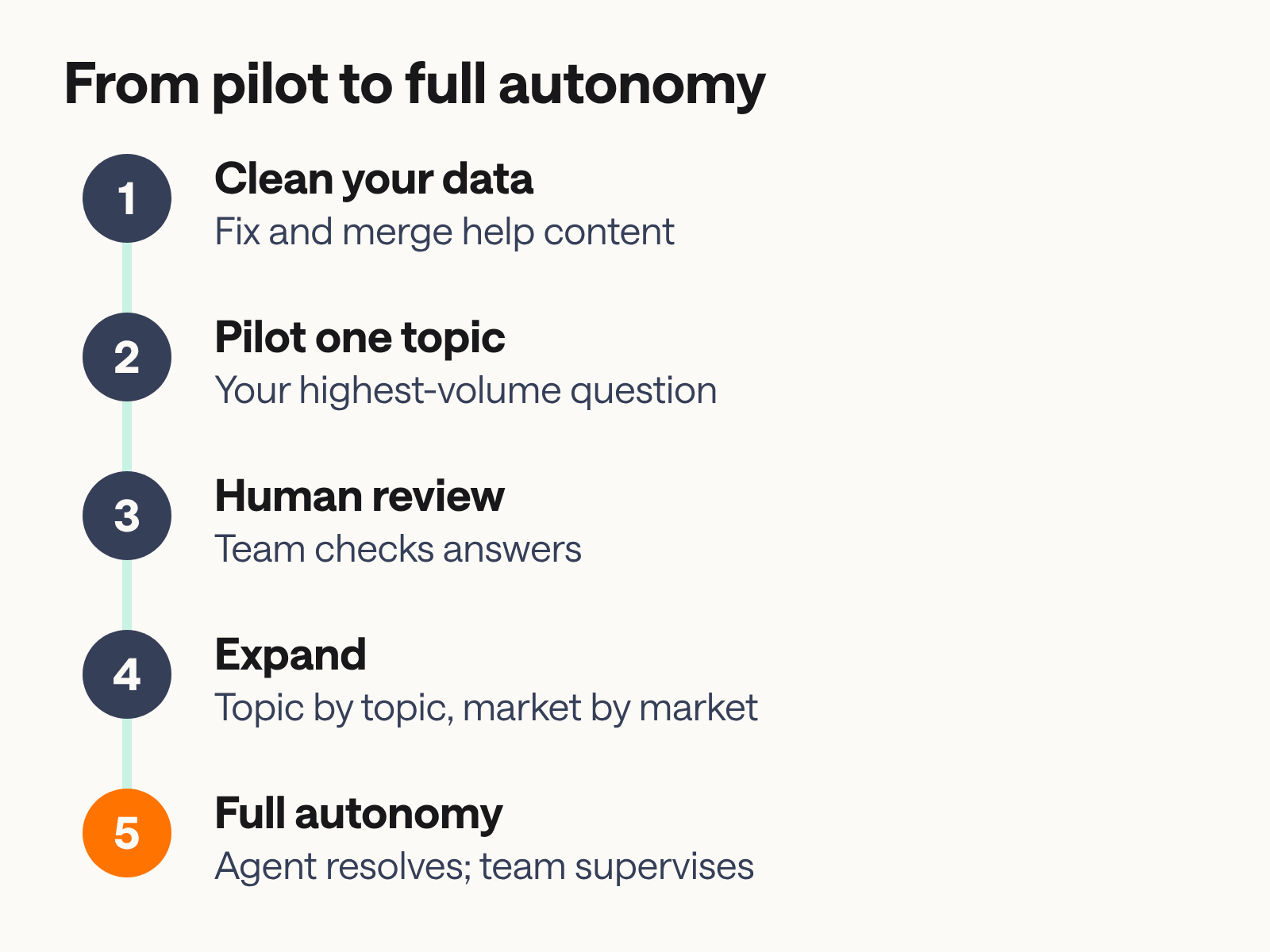
- Define your goals. Find the repetitive tasks that take up most of your team's time. Audit your ticket data and conversation history, and rank topics by volume. In most support teams, a small group of topics, such as order status, returns, and delivery changes, makes up a large share of the volume. Start there.
- Train your AI agent. You don't need to start from scratch. Use your existing help centre articles, macros, and past conversations as source material. Clean the knowledge base first: remove outdated policies, merge duplicate articles, and fix contradictions, because the agent will repeat whatever it finds.
- Keep the context. Connect the AI agent to your CRM, order management, and support platform, so it knows who the customer is, what they ordered, and what they discussed with your team last time.
- Plan the human escalation. Give customers a clear, easy way to reach a person when the AI agent can't resolve their issue. Start with a human-in-the-loop (HITL) phase, in which your team reviews AI answers for accuracy before you give the agent full autonomy on a topic.
- Review and improve. Read conversation logs and feedback every week, find where the agent fell short, and update content and workflows. Then add the next topic.
For a team handling 100,000 or more tickets a year, a realistic rollout runs in stages: a pilot on one high-volume topic in the first weeks, a supervised HITL phase while you measure accuracy, and then expansion topic by topic and market by market over the following months.
Maintaining the human element in an automated workflow
The strongest setups use automation to support staff, and they keep people in charge of the cases that need them. Gartner predicts that by 2028, none of the Fortune 500 will have removed all human customer service.
Define your escalation path in writing. Offer a person when the customer asks for one, when the AI agent's confidence is low, when sentiment turns negative, or when the case involves money at risk, a complaint, or a vulnerable customer. Pass the full conversation to the human agent, so the customer doesn't have to repeat themselves.
As AI takes the routine volume, support roles change. Experienced agents can become AI managers or CX strategists who write and review content, study conversation data, and decide which topics to automate next. Be open with customers as well: tell them when they're talking to an AI agent, and make the route to a person easy to find, which also builds trust over time. Read more about building trust with customers who use AI agents.
Examples of automated customer support workflows
These automated customer service examples show how one conversation moves through the system.
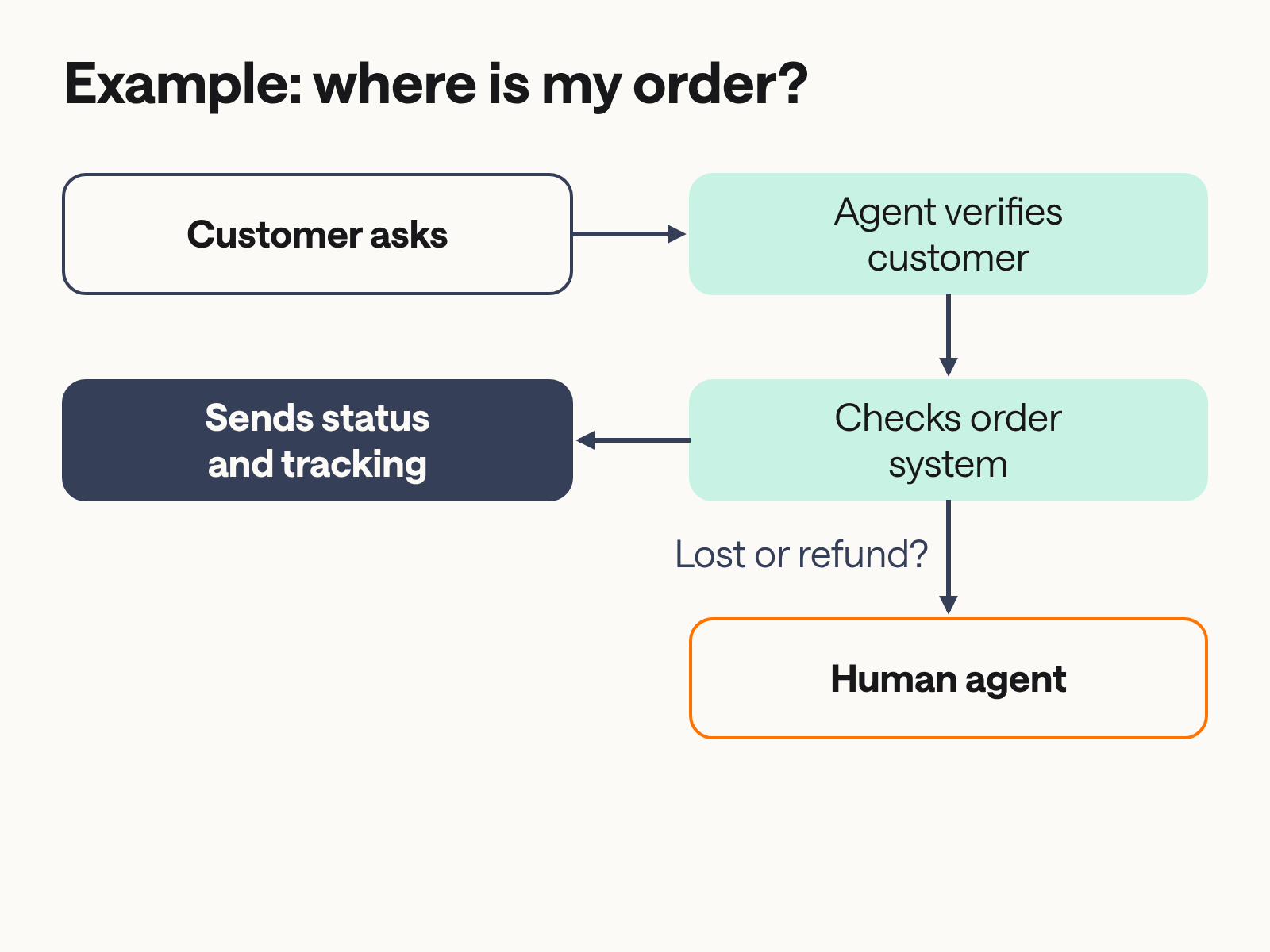
A customer asks where their order is. The AI agent verifies the customer, checks the order management system, and replies with the carrier, tracking link, and expected delivery date. If the parcel shows as lost, or the customer asks for a refund, the agent hands the conversation to a human agent with the order details attached, and that agent decides on compensation.
The same pattern applies across e-commerce and other B2C sectors: a return registered and a label sent, an invoice copy delivered after the customer signs in, or a delivery address changed before dispatch. For more ideas, see these use cases.
How Kindly helps European B2C brands automate customer support
Most support leaders who evaluate automation have already tried a generic FAQ tool and found it lacking. Off-the-shelf tools are built for the average case. They aren't built for a brand handling 100,000 tickets a year in several languages, with GDPR obligations and a brand voice to protect. A generic tool often deflects a ticket without resolving the issue, and the customer comes back by email or phone. A purpose-built AI agent finishes the task.
Kindly is Europe's most reliable AI Support Platform, built for B2C brands in retail, e-commerce, and travel. On the Kindly platform, AI Support Agents ground their answers in your verified data, and you can template exact answers word for word where wording matters. They connect to your CRM, order management, and authentication, so they can check an order or register a return. When a conversation needs a person, your colleagues pick it up where the AI Support Agent left off, with the full context. AI Support Agents work in more than 100 languages across web, in-app, voice, WhatsApp, and Messenger. Kindly processes and stores authentication, conversation, and platform data in EU data centres, and offers an all-EU configuration for generative AI on request.
In practice, Cellbes reports a 77% automation rate for chats in Sweden, with customers tracking parcels in chat through its Ingrid integration, even outside opening hours. Voi started with its most common topic, parking, and its AI Support Agent resolves 89% of parking enquiries before they reach a person. Simple use cases go live within a day, and deployments with several integrations or markets take one to three weeks. If you'd like to see how this works with your ticket volume and language mix, book a demo.
Critical features for enterprise-grade support automation
When you compare AI tools for customer service, check these features before you sign.
- Security and compliance: GDPR compliance, a data processing agreement, a public subprocessor list, and clear answers on where data is stored and processed in the EU. Ask for security certifications such as ISO/IEC 27001 or a SOC 2 report.
- Integrations: deep, two-way connections to your CRM, ERP, and order management, so the AI agent works with real-time customer data.
- Analytics: reports on resolution rate, not deflection rate alone. A deflected ticket may still return as an email or a call.
- Control over answers: grounding in your own content, templated answers for sensitive topics, and logs of every conversation for audit.
- Human-in-the-loop handover: a smooth handover to staff for high-stakes or emotional situations, with the full conversation attached.
Measuring the ROI of automated customer support
Measure ROI on both sides of the ledger: the cost you save on routine tickets and the revenue you protect or win. Proactive engagement, such as a delay notice or help at checkout, prevents tickets and lost sales, so it often returns more than reactive support.
Start with cost per resolution. Divide your total support cost for a topic (salaries, tools, overheads) by the number of tickets resolved, and compare the human figure with the AI figure for the same routine tasks. For revenue, track the orders completed after an AI agent answered a pre-purchase question or stepped in on an abandoned cart, and multiply by average order value.
Look at the effects that take longer as well. 24/7 availability means customers in high-volume e-commerce and retail get answers at the moment they're ready to buy, which supports customer lifetime value. Taking repetitive tickets off your team can also improve agent satisfaction and retention, since people spend more of the day on work that uses their skills. For an industry benchmark, Gartner's 2029 prediction puts the operational cost reduction from agentic AI at 30%.
Track these metrics:
- Automation or resolution rate: the share of conversations the AI agent resolves without a person.
- Deflection rate: the share of contacts that never become a ticket. Read it alongside the resolution rate.
- Cost per resolution: the full cost of resolving one ticket, by channel and by human or AI.
- CSAT: customer satisfaction for automated and human conversations, measured as two figures.
- Agent satisfaction: how your team rates their workload and tools, measured every quarter.
- Revenue influenced: orders completed after an AI-assisted conversation.
The future of support: agentic AI and beyond
Agentic AI is moving from answering questions to carrying out complex tasks across several systems at once. One request, such as "cancel my subscription and refund the last payment", will touch billing, CRM, and payments, and the AI agent will complete each step and confirm the result.
Personalisation will go further too. An AI agent with access to a customer's full order and conversation history can recall a complaint from years ago or a preferred delivery option in seconds. For transactional sectors such as retail, e-commerce, and travel, this points towards zero-touch support for routine requests, with people focused on the cases where judgement matters.
AI support automation FAQ
These answers cover the questions support leaders ask most when they evaluate AI customer support.
Can AI agents handle complex, multi-step customer issues?

Yes, within limits. Modern AI agents reason through a request step by step and call external systems through APIs to complete tasks, such as checking an order and then registering a return. They work best when grounded in a well-maintained knowledge base and connected to your back-end systems, and complex technical troubleshooting or sensitive cases should still go to a person.
How does support automation affect CSAT and NPS scores?
Automation tends to raise satisfaction when it resolves issues fast and offers a clear route to a person. Gartner's 2026 survey found that 50% of customers say GenAI makes their interactions easier, while 87% say companies must provide access to a human agent. Track CSAT for automated and human conversations as two figures, so you can see where each works.
How much can automation reduce support costs?
Gartner predicts that agentic AI will cut operational costs by 30% by 2029. Your own savings depend on your ticket mix: teams with a high share of repetitive questions, such as order status and returns, save the most.
Which industries benefit most from AI support agents?
High-volume B2C sectors benefit most, including e-commerce, retail, travel, and telecommunications. These sectors receive large numbers of repetitive questions about orders, bookings, invoices, and accounts, which AI agents can resolve end to end.
Will AI replace human customer service agents?
No. AI changes what support agents do. Gartner predicts that none of the Fortune 500 will have removed all human customer service by 2028, and human agents will spend more of their time on complex, high-empathy cases.
Is automated customer support secure and GDPR compliant for European businesses?
It can be, if you choose the right vendor. Look for encryption in transit and at rest, a data processing agreement, a public subprocessor list, EU data storage, and certifications such as ISO/IEC 27001. Under the EU AI Act, you must also tell customers when they're interacting with AI.
What are the 4 pillars of automation?
There's no single standard definition, but in customer support the four pillars are often described as people, process, technology, and data. People own and supervise the automation, processes define what gets automated and when to escalate, technology carries out the work, and clean data keeps answers accurate.
How long does it take to see results from AI implementation?
Most teams see early results within weeks. On Kindly, simple use cases go live within a day, and deployments with several integrations or markets take one to three weeks. Expect a few more weeks of supervised review before you give the AI agent full autonomy on a topic.
Stop hiring for volume and start automating for growth
Automated customer support lets your team handle growing ticket volume without adding headcount for every peak, and it gives your agents more time for the conversations that need them. Start with your highest-volume topic, connect the systems behind it, and build from there. If you're weighing AI against outsourced customer support, or want to see why AI agents lead the top customer self-service tools, those guides are a good next read.
To see how AI Support Agents on the Kindly platform would handle your ticket volume and languages, book a demo.